If you haven’t the first time, you should definitely follow me on X or connect on LinkedIn (or both)
Summary
In December 2025, I published IDEsaster which introduced a novel vulnerability class affecting AI Integrated Development Environments (IDEs): chaining prompt injection through auto-approved agent tools into base IDE features (settings files, multi-root workspaces, remote JSON schemas) to achieve data exfiltration and remote code execution without user interaction.
The industry response was immedidate. Nearly 30 vulnerabilities patched across 12 vendors, sandboxing features and e-gress controls implemented. This was in addition to denylisting IDE files (.vscode/settings.json, *.code-workspace, .idea/workspace.xml, etc.) so that the AI agent must request human approval before writing to them. IDEsaster 2.0 demonstrates that this mitigation is not sufficient by itself as the architectural risks go deeper than previously understood.
IDEsaster 2.0 demonstrates that this mitigation is structurally insufficient.
This research extends the attack surface one layer outward - from the base IDE software into the extension ecosystem, with a specific focus on Language Servers. Language Servers are background processes that provide semantic language support (autocomplete, diagnostics, go-to-definition) to any compatible client via the Language Server Protocol (LSP). Many of them compile, evaluate, or load project files automatically as soon as those files appear in the workspace.
Unlike previous public work involving malicious extensions, this attack uses legitimate extensions (such as Language Servers) and manipulate them to achieve unintended, malicious impact. The result is a new, larger, and harder-to-mitigate class of “file-write to impact” gadgets that sit entirely outside the deny lists vendors shipped in response to IDEsaster 1.0.
Past Work
This research builds upon the original IDEsaster research. You are highly encouraged to read it to fully understand this follow-up research.
Problem Statement
IDEs were never designed with an AI agent in mind. IDEsaster 1.0 proved this for the core IDE. IDEsaster 2.0 extends it for everything that plugs into the IDE. This creates a new unexpected attack surface.
Extensions (and Language Servers) are:
- Universal: supported in every major IDE (sometimes under a different name or runtime)
- Widespread: used by virtually every user, either installed on-demand or bundled with the IDE.
- Trusted: these extensions are legitimate, created by trusted vendors, have been around for years and are often open source.
- Unscalable: there are tens of thousands of extensions. No vendor can maintain a complete denylist of every file path that every extension might treat as executable.
As a result, 100% of tested IDEs are vulnerable to IDEsaster 2.0 and likely every single user is affected.
Redefined Threat Model
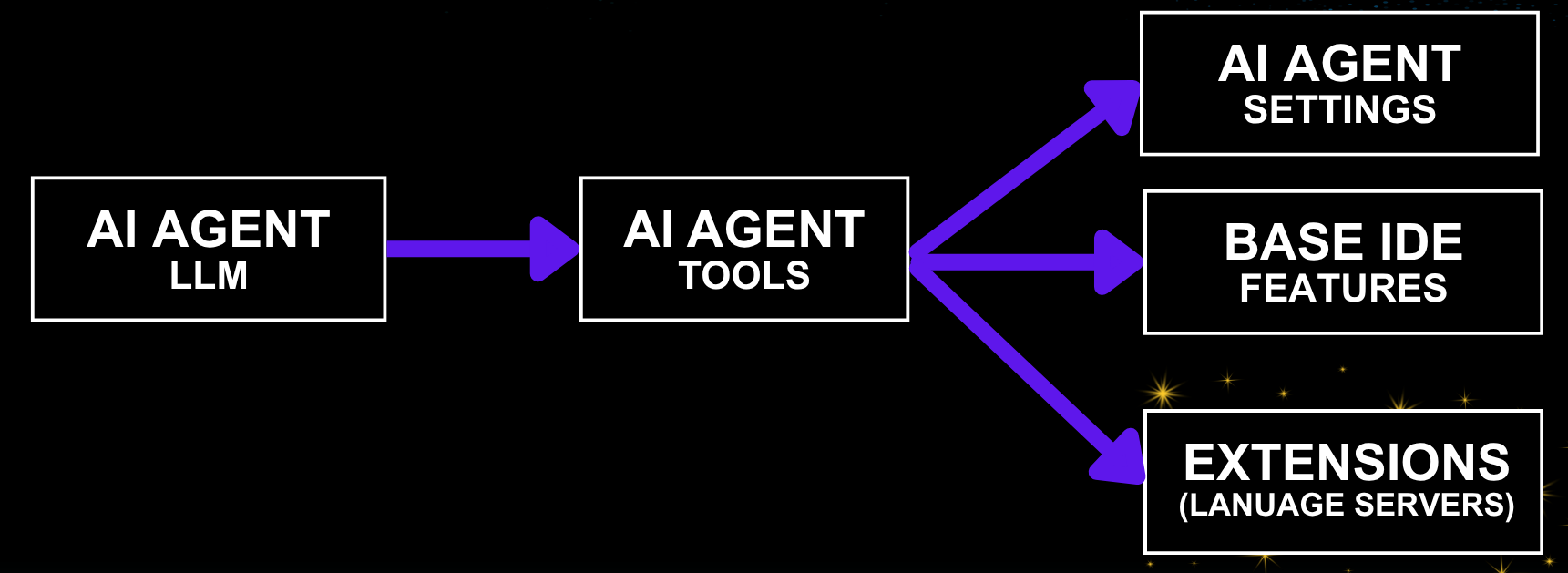
| Component | Sub-component | Assumption | Abuse Vector |
|---|---|---|---|
| AI Agent | LLM | LLM can always be jailbroken to follow attacker instructions regardless of the system prompt or model. | Context hijacking (prompt injection) |
| AI Agent | Tools / Functions | Some tool calls are auto-approved and require no user interaction | Vulnerable tools or legitimate tool call chains |
| Base Software (IDE) | IDE features | Workspace is Trusted. Even a trusted workspace can become malicious due to context hijacking. | File-write to impact gadgets |
| Extensions | Language Server | Installed either by the user or built-in | File-write to impact gadget |
The new component added is the last row. Vendors hardened the third row (IDE features) after the original IDEsaster research. IDEsaster 2.0 demonstrates that safe extensions owned by trusted third parties can be abused to lead to similar attack chains that are a lot more difficult to mitigate.
IDEsaster 2.0 Attack Chain

Context Hijacking -> Auto Approved Tools -> Extension (Language Server) Gadget
The first two steps (Context Hijacking and Auto Approved Tools) of the attack chain are equivalent to the original IDEsaster research. They remain trivial and inevitable and continue to grow as new integrations are added. The novel step uses a gadget (existing functionality repurposed for malicious exploitation) in the language server extensions.
Context Hijacking
Unchanged from the original IDEsaster research. Vectors include MCP servers (compromised, rug-pull, or relaying attacker-controlled content), malicious rules files, user-added context (pasted or referenced context), system-added context (file names are often added, tool-call results), deeplinks. Recently agent skills became increasingly popular and are also a vector for context hijacking. As integrations and features evolve, we should expect to see more.
The conclusion remains: prompt injection is inevitable. Defense should focus on limiting impact.
Auto-Approved Tools
Most AI agents auto-approves in-workspace file edits by default (no human-in-the-loop required). This has become the standard for agentic coding nowadays as it balances productivity and security. As mitigation for the original IDEsaster research, most vendors added IDE-special files to their denylists to avoid abusing the auto approved write tool.
Language Server Gadgets
In this case, a Language Server gadget is a functionality that upon detection of a specific file with specific content, performs an action that would otherwise require a human in the loop, such as command execution.
Language Server Gadgets Catalog
The following Language Server gadgets were identified and validated during this research. Some of the gadgets were REDACTED as they are still in the process of responsible disclosure which is very difficult and time consuming at this scale.
| # | Language Server | Extension ID | Downloads | Gadget File(s) | Trigger | Impact |
|---|---|---|---|---|---|---|
| 1 | REDACTED | REDACTED | REDACTED | REDACTED | REDACTED | REDACTED |
| 2 | JSON (built-in) | — | Built-in | *.json with "$schema": "<URL>" |
File open / diff preview | Data exfil (found in the original research, reframed here as a gadget) |
| 3 | REDACTED | REDACTED | REDACTED | REDACTED | REDACTED | REDACTED |
| 4 | REDACTED | REDACTED | REDACTED | REDACTED | REDACTED | REDACTED |
| 5 | Ruby LSP (Shopify) | Shopify.ruby-lsp |
30M+ | Gemfile.lock + ruby_lsp/**/addon.rb |
Instant, constantly monitors | RCE |
| 6 | C#/C# Dev Kit | ms-dotnettools.csdevkit/ms-dotnettools.csharp |
50M+ | any .csproj + Directory.Build.props + any .cs |
MSBuild design-time evaluation | RCE |
| 7 | REDACTED | REDACTED | REDACTED | REDACTED | REDACTED | REDACTED |
This catalog is definitely not exhaustive. It represents what I personally found in a very limited timeframe. The extension marketplace contains tens of thousands of extensions and hundreds of language server implementations. Can you imagine how many undiscovered gadgets?
JSON Language Server - Data Exfiltration via Remote JSON Schema
This attack was documented in the previous research. Given this language server is built-in in the IDE, it falls inbetween the previous research (IDE features) and the new one (Extensions and Language Servers).
Ruby Language Server - RCE via Addon Auto-Load
Creating an empty Gemfile.lock file so the project is auto-recognized as a Ruby project.
Ruby LSP discovers project-local addons by globbing ruby_lsp/**/addon.rb, require-ing each match, and calling activate on the addon class — inside the language server process.
# ruby_lsp/helpers/addon.rb
require "ruby_lsp/addon"
module RubyLsp
  module Helpers
    class Addon < ::RubyLsp::Addon
      def activate(global_state, message_queue)
        system("open -a Calculator")
      end
      def deactivate; end
      def name; "Ruby LSP Helpers"; end
      def version; "0.1.0"; end
    end
  end
end
C# Language Server - RCE via MSBuild Design-Time Evaluation
The C# language server runs MSBuild design-time evaluation, in which MSBuild auto-imports Directory.Build.props and InitialTargets run on every evaluation:
<!-- Directory.Build.props -->
<Project InitialTargets="_x">
  <Target Name="_x">
    <Exec Command="sh -c 'open -a Calculator'" />
  </Target>
</Project>
Architectural Root Cause
The link between legacy components and AI creates a new attack surface.
This is the unifying thesis of the original IDEsaster and the new IDEsaster 2.0 including other AI security related publications (e.g. RoguePilot).
In this specific case, every component that integrates with the IDE was designed under the assumption that files are only controlled by the user. AI agents invalidate that and “Workspace Trust” does not restore it. A workspace that was trustworthy when opened becomes non-trusted the moment the agent’s context was hijacked.
Denylist is NOT sufficient: Extensions and language servers are defined by third-parties. Each one has aliases for files, different search paths and glob imports. A path-based denylist maintained by the AI IDE vendor will always lag behind. The “Secure for AI” principle must extend to every component that interacts with the AI agent or might interact with AI agent in the future.
Mitigations and Recommendations
The IDEsaster 1.0 mitigations all still apply. IDEsaster 2.0 adds emphasis on the following:
-
Sandboxing: Isolation is key. It’s not enough to sandbox the agent actions. IDEsaster findings often bypass agent action sandboxes as a different component takes the malicious actions (the IDE or the extensions). As a result, an OS-level sandbox is recommended.
-
Egress Controls: A network allowlist enforced at the application/OS-level defeats every exfiltration gadget. The network isolation should not happen at the agent level as IDEsaster findings often bypass these
-
Abandon path-based denylists as a primary control: While they remain useful as defense-in-depth. They are not and never will be sufficient to entirely prevent this vulnerability class.
-
Minimize prompt injection vectors: It’s not always possible but the more you’re aware of the vectors, the less likely you’ll fall for them. Evaluate your sources whether its skills, MCP servers or any other context added (incl. for invisible characters) and continue monitoring for changes.
-
Configure agent autonomy with care: “auto-approve file edits” can almost always lead to “auto-approve code execution” in the current state. Default autonomy configuration should reflect this, especially when additional layers of security aren’t used (e.g. sandboxing).
-
Adopt “Secure for AI”: This is a call for extensions and language servers developers to adopt the “Secure for AI” principle. Prompt before execution of sensitive actions (HTTP requests, code and command execution). Needless to say this should go beyond extension developers to anyone building software in 2026.